
Scene Selector Overlay
💡
3
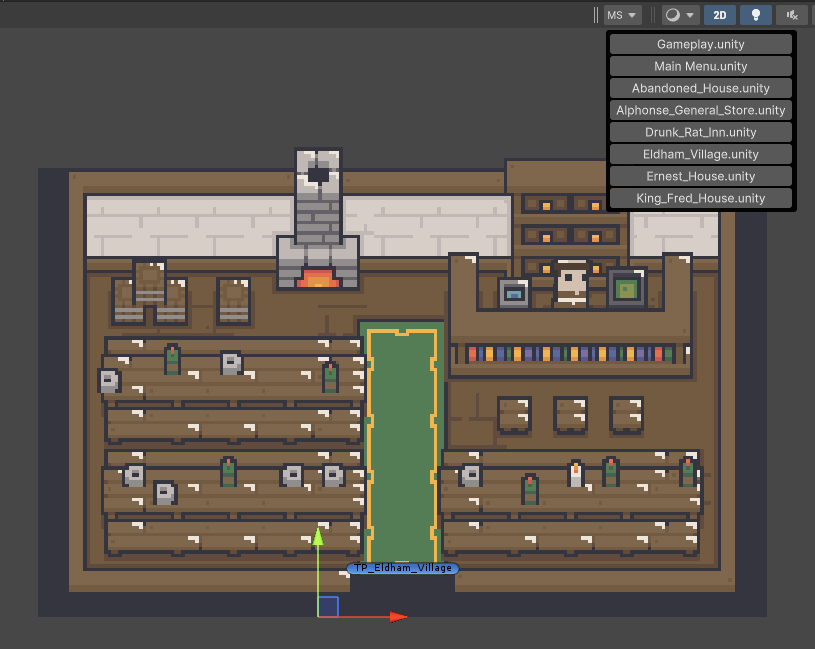
This editor script adds a popup menu to the scene view to navigate between scenes. This could be useful when designing different maps without having to use the asset browser every time you need to switch from one map to another.
Add this script anywhere (ideally in an Editor assembly) SceneSelectorOverlay.cs:
using UnityEditor;
using UnityEditor.Overlays;
using UnityEngine.UIElements;
using System.Linq;
using UnityEditor.SceneManagement;

namespace Gyvr.Mythril2D
{
    [Overlay(typeof(SceneView), "Mythril2D Scene Selector", true)]
    public class SceneSelectorOverlay : Overlay
    {
        public override VisualElement CreatePanelContent()
        {
            var root = new VisualElement() { };

            string[] guids = AssetDatabase.FindAssets("t:scene", null);
            var scenes = guids.Select(guid => AssetDatabase.GUIDToAssetPath(guid)).ToArray();

            foreach (var scene in scenes)
            {
                var button = new Button() { text = scene.Split('/').Last() };
                button.clicked += () => EditorSceneManager.OpenScene(scene);
                root.Add(button);
            }

            return root;
        }
    }
}
Usage:
- Open the scene view
- Click anywhere inside the view
- Press [SPACE]
- Enable “Mythril2D Scene Selector”
- Enjoy!
💬 Comments (3)
Want to continue the conversation?