
Rarity Items Badge (3.1)💎💎
💡
6

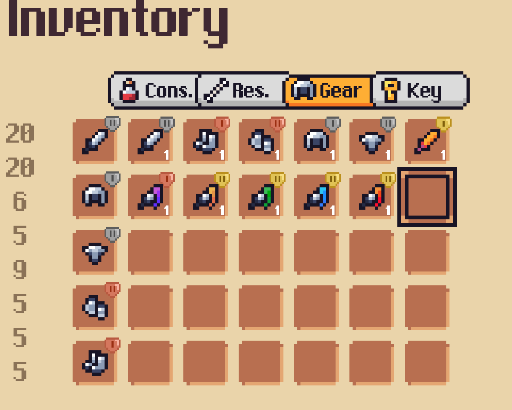
Implement icon for rarity of the items in your game! (No credits needed for the sprite, use as you wish!)
Import assets
- Import the
GradeSheet.csand the sprite
Code changes
To Item.cs add the following in line ~40:
        [SerializeField] private GradeSheet m_grade = null;
        public GradeSheet grade => m_grade;
To UIInventoryBagSlot.cs and the following lines:
//line ~12
        [SerializeField] private Image m_grade = null;
In SetItem method, inside of the if else statement, add the following lines (dont change anything else, just add this code to it):
//if (item){
...
    if (m_grade.enabled = item.grade!=null)
    {
        m_grade.sprite = item.grade.icon;
    }
//else {
    ...
    m_grade.enabled = false;
//}
To UIInventoryEquipmentSlot.cs we will do exactly the same thing has previous task. Add following lines:
On top, in the [SerializeFields], add the following field:
//line ~12
        [SerializeField] private Image m_grade = null;
In SetEquipment method, inside of the if else statement add the following lines (dont change anything else, just add the code there):
If statement:
//if (equipment){ ..
    if (m_grade.enabled = equipment.grade!=null)
    {
        m_grade.sprite = equipment.grade.icon;
    }
//}
If statement:
//else {

    ... //add the following:
    m_grade.enabled = false;
//}
Setup The UI
- Open
Equipment Slotprefab, add aImageobject namedGradeinsideEquipment Slot. Ajust position and size. Size i recomend (30,30) - Click
Equipment Slotand drag theGradeobjecto to theGradeparameter. - Do all the same for
Bag item Slotprefab.
Create Grades
- Right click in the project go to
Create/Mythril2D/Grade/GradeSheet. Create as many as you like, set the grade sprite.
Setup Items Grade
- Open one item in
Database/Itemsand set the grade.
!Nice gaming!
💬 Comments (12)
📎 Files
Runtime/Scripts/Database/Gradeto put the file. And a folder inDemo/Database/Gradefor the sheet you generate.📜 Scripts
Want to continue the conversation?