
Loading Map Name (3.1) 🗺✍
💡
5
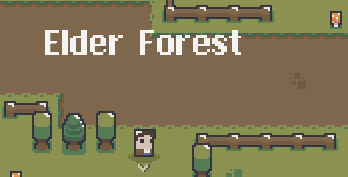
So whenever you you transport or start the game, it just promps the name of the map. Things to consider:
- the name it’s the scene name (standard in Mythil2D)
- consider that it loads even for those that you probably don’t want, like a side room or something (to be fixed in the future)
** Bugs to be fixed:**
- Whenever a UI it’s open, the text can still be seen, and sometimes (inventory for example) it display over it.
** Steps: **
- Import scripts to ```Scripts/UI/FloatingTexts/MapSwitchText.cs
* Duplicate the ```Prefabs/UI/Floating/FloatingText.prefab``` call it "MapSwitchText" and inside remove the "Animator" from ```Animated Text``` object.
* Set font size to ~95.5
* Attach the imported script "MapSwitchText.cs" to it. Note: You can also twick the values in it.

** Changes: **
* Update the "TransitionSystem.cs" adding the following method:
    public void setActive(Boolean state)
    {
        m_blackScreenGameObject.SetActive(state);
    }
* Update "EditorPlayModeOverride.cs" changing line "75" from ```GameManager.TransitionSystem.gameObject.setActive(false);``` to ```GameManager.TransitionSystem.setActive(false);
** Setup: **
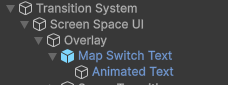
- Open “M2DEngine” and add the prefab create in “Step” as a child of “Overlay” (image in attachment)
That’s it! Happy gaming!
Forgot attachment script! ^_^^«
💬 Comments (1)
Want to continue the conversation?