
Wearable System (3.*) - Player Only 🪖👚🩳
The 3.*v wearable system, that wears the equipment you equip. This post only handles the Player, since to apply to other entities will take some more changes.
New version at:https://discord.com/channels/1090763611938496553/1367924831374282782
Technical Doc
Basically we create animator objects inside of the entity (Hero), then use the entity “AAnimationStrategy.cs” to manage all of them. From this moment forward, all “Animation Stractegies” can manage other stractegies inside, like… gear, swards, effects, FX, you name it.
The wearable object contains “Wearable.cs” and a copy of the entity components and the animator (child of the wearable) object are a direct copy of the “Body” object.
Then we assign all the wearables to the entity variable (created by us). The system passes this list to the entity stractegy that now can handle multiple dependent stractegies, and it triggers all the proper animations.
On top of that, obviously we have to setup the sprites, create sprite libraries and assign to the equipment the seprite libraries.
All the files at the last comment!
Note this version has some bugs:
- On death/pause/resume does not update wearable
** STEPS IN THE COMMENTS**
** Lets me know if you have any issues, and leave a like 😊 **
IAnimationStractegy.cs
 //add this:
        void AddDependentStrategy(IAnimationStrategy dependentStrategy);
        void AnimatorSetTrigger(string trigger);
        void AnimatorSetBool(string property, bool state);
AAnimationStractegy.cs
 //add this:
        public void AddDependentStrategy(IAnimationStrategy dependentStrategy)
        {
            if (m_externalTriggerableAnimators == null)
            {
                m_externalTriggerableAnimators = new IAnimationStrategy[] { dependentStrategy };
            }
            else
            {
                Array.Resize(ref m_externalTriggerableAnimators, m_externalTriggerableAnimators.Length + 1);
                m_externalTriggerableAnimators[^1] = dependentStrategy;
            }
        }

        public virtual void SetTriggerableAnimatorsDirection(Vector2 direction)
        {

            if (m_externalTriggerableAnimators != null)
            {
                foreach (var instance in m_externalTriggerableAnimators)
                {
                    instance.SetLookAtDirection(direction);
                }
            }
        }

        public virtual void AnimatorSetTrigger(string trigger)
        {
            m_animator.SetTrigger(trigger);

            if (m_externalTriggerableAnimators != null)
            {
                foreach (var instance in m_externalTriggerableAnimators)
                {
                    instance.AnimatorSetTrigger(trigger);
                }
            }
        }

        public virtual void AnimatorSetBool(string property, bool state)
        {
            m_animator.SetBool(property, state);

            if (m_externalTriggerableAnimators != null)
            {
                foreach (var instance in m_externalTriggerableAnimators)
                {
                    instance.AnimatorSetBool(property, state);
                }
            }
        }
Then replace every instance of:
m_animator.SetTrigger```` withAnimatorSetTrigger
* ```m_animator.SetBool```` with ```AnimatorSetBool
BidirectionalAnimationStrategy.cs & PolydirectionalAnimationStrategy.cs
In the SetLookAtDirection method, add at the end:
SetTriggerableAnimatorsDirection(direction);
Example of the “PolydirectionalAnimationStrategy.cs”:
 public override void SetLookAtDirection(Vector2 direction)
 {
     base.SetLookAtDirection(direction);

     if (m_spriteLibrary && m_animationDirectionOverrides.Count > 0)
     {
         AnimationDirectionOverride? animationDirectionOverride = GetAnimationOverride(direction);
         if (animationDirectionOverride != null)
         {
             m_spriteLibrary.spriteLibraryAsset = animationDirectionOverride.Value.spriteLibrary;
             m_spriteRenderer.flipX = animationDirectionOverride.Value.flipSprite;
         }
     }
     SetTriggerableAnimatorsDirection(direction); //add this at the end
 }
Hero.cs
Add the following lines:
        protected void UpdateWearables()
        {
            if (m_wearables != null && m_wearables.Length > 0)
            {
                foreach (var wearableEntry in m_wearables)
                {
                    if (wearableEntry != null && m_equipments.TryGetValue(wearableEntry.equipmentType, out Equipment equipment))
                    {
                        wearableEntry.SetEquipment(equipment);
                    }
                    else if (wearableEntry != null)
                    {
                        wearableEntry.SetEquipment(null); // Clear the equipment if none is assigned
                    }
                }
            }
        }

        protected void InitializeWearables()
        {
            if (m_wearables != null && m_wearables.Length > 0) {
                foreach (var wearableEntry in m_wearables)
                {
                    m_animationStrategy.AddDependentStrategy(wearableEntry.animationStrategy);
                }
            }
        }
And add the following:
- Equip method, add at the end before the return:
`csharp
            UpdateWearables(); //add this
            return previousEquipment;
- Unequip method, add at the end before the return:
`csharp
            UpdateWearables(); // add this
            return toUnequip;
And replace the Awake method with the following:
`
 protected override void Awake()
 {
     base.Awake();
     InitializeWearables();
 }
Enough of changes, lets have some fun!
- Import the “Wearable.cs” into Scripts/Wearables/Wearable.cs.
Setup Hero Prefab
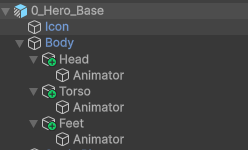
Open 0_Hero_Base, create the body part object (Head,Torso, Feet,…) and another inside called “Animator”, like in one of the images in attachment (You can start with only one like head for testing). For now i’ll call these “wearable” and the child as “wearable animator”.
Note: You can copy the “Body” object and rename it as “Animator”, since the object it’s equal.
Animator
- Make sure it has a “Sprite Renderer”, Animator with “AC_Character” controller setup, and a “Sprite Resolver”.
- In the “Sprite Renderer” set the property “Order in layer” to 2, we want it to be on top of the “Body”.
Wearable
- Add “Wearable.cs” and add a “Sprite Library” component.
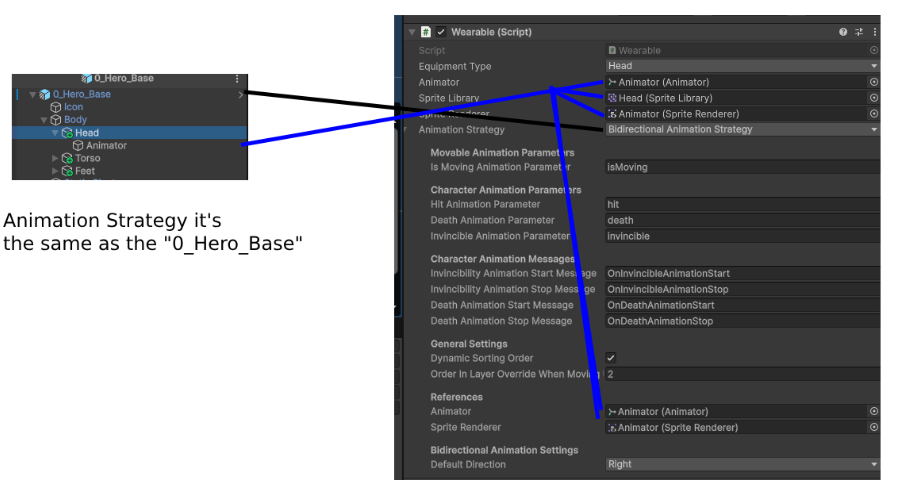
- Set the Animation Strategy - it’s the same has you have in the entity (0_Hero_Base) in the CharacterBase.cs component.
- In the “Wearable.cs” component, drag the “Animator” to all the properties inclusing to the “Animation Strategy” (image explaining in attachment).
Assign the wearables to the hero
If you click on the entity 0_Hero_Base the last prooperty of the Hero.cs script “Wearables”. Drag all the wearables into it (Head, Torso, Feet,….)
Let’s create our wearables!
Import And Setup assets
- Export the “Gear.zip” that contains the “Knight Gear” sprites, and put it in Demo/Sprites/ThirdParty/analogStudios_/Gear
- Select all the sprites and set the following configuration (if you’re using analogStudios_ it would be= PixelsPerUnit:16; SpriteMode: Multiple FilterMode:Point(no filter); Compression: none)
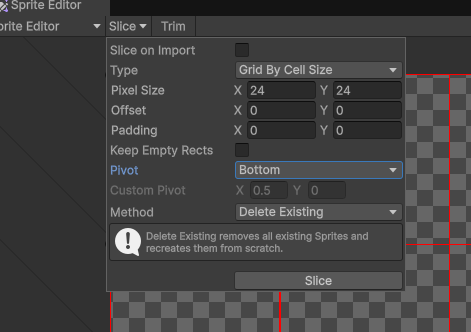
- Click in Open SPrite Editor and setup. (image showcase in attachment)
Create Sprite Library
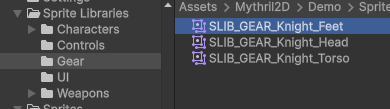
- Create a folder in Sprite Libraries/Gear, Copy one of the Sprite Libraries of the “Hero” and past it here. Give a name like “SLIB_GEAR_Knight_Head”… set it up and the duplicate for all the other wearables (helmet, torso, feet) (image showcase in attachment)
Setup Equipment with out sprite animation
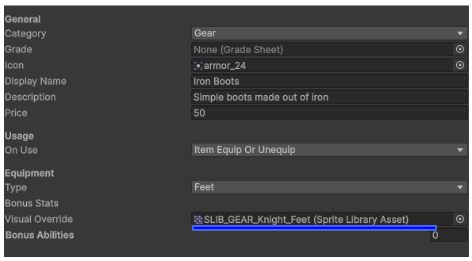
Go to the item you want and just put the Sprite lIBRARY in the Visual Override (Image showcase in attachment)
HAVE FUN!!!!#
** Let me know if you’re having any problems! **
All character wearable system now available in: https://discord.com/channels/1090763611938496553/1367924831374282782
💬 Comments (0)
Be the first to comment! Join our Discord to share your thoughts.
Want to continue the conversation?