
Mini-icon for Quests 💬⁉
 2
2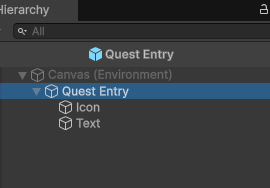

Set icons for your quests based on a type. I use it only for main and side quests, but you can use it for all kinds, as seen in the video example.
This request was made initialy by @BellBlitzKing in https://discord.com/channels/1090763611938496553/1363220677779525822.
Import assets
It’s very simple to do actually. First import the QuestType.cs into you project. Replace your UIJornalQuestEntry.cs with the one in attachment.
90% done already
Add type to quest
Open quest.cs and add:
        [SerializeField] private QuestType m_type;
        public QuestType type => m_type;
Canvas setup,
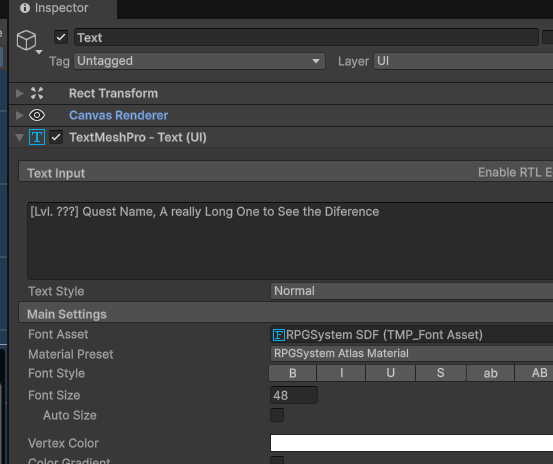
Open your Quest Entry object and to the already existent object add as child an image and name it “Icon”, and create a “emptyobject” and rename it to “Text”. Cut and past the TextMeshPro from the parent object to the text object.
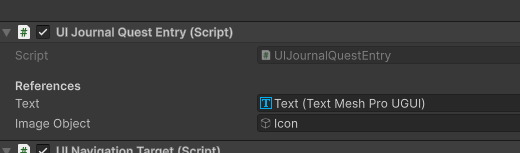
Now in the parent in the script UIJornalQuestEntry assign the text and image object to the proper properties.
Notes: I advice to add a Horizontal Layout Group component to te parent, with “Spacing:12; Child Aligment:Middle Left”
Create Types
Right click on the project, Go to Mythril2d->quests->QuestType. Set the icon you want.
(Create as many as you like)
(Final) Assign type to quests
Go to you quest (search for “QUEST_”) and assign the type you want!
💬 Comments (3)
Want to continue the conversation?