
Skill Tree 🪄🌳❕
 7
7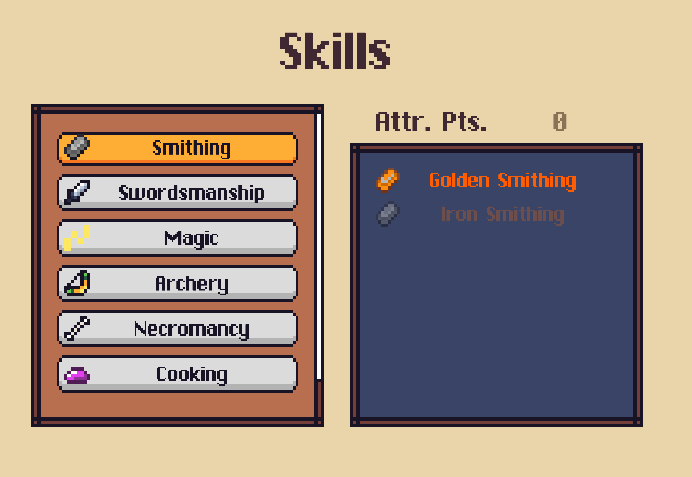
Tree system for skills just like Starfield, Skyrim, etc. Add/replace abilities, stats, etc.
Note: This has a lot of space for improvement and will be reviewed (one day?) 😁
Check comments for updates necessary.
Import Package (in comments)
Changes
Hero.cs
//public class HeroDataBlock : CharacterBaseDataBlock {
//...
        public DatabaseEntryReference<Skill>[] skills;
//...
}
Add properties:
        public Skill[] skills => m_skills;
        private Skill[] m_skills = new Skill[0];
Add methods:
        public Skill[] FindSkill(ESkillCategory skillCategory)
        {
            return m_skills.Where(skill => skill.category == skillCategory).ToArray();
        }
        public bool HasSkill(Skill skill)
        {
            return m_skills.Any(skl => skl == skill);
        }
        public void AddSkill(Skill skill)
        {
            var skillsList = m_skills.ToList();
            skillsList.Add(skill);
            m_skills = skillsList.ToArray();
        }

        public void RemoveSkill(Skill skill)
        {
            var skillList = m_skills.ToList();
            if (skillList.Remove(skill))
            {
                m_skills = skillList.ToArray();
            }
        }
In OnSave method add:
// after "heroBlock.recipes = m_recipe..." add:
            heroBlock.skills = m_skills.Select(skill => GameManager.Database.CreateReference(skill)).ToArray();
In OnLoad method add:
//after "m_recipes = heroBlock...." add:
            m_skills = heroBlock.skills.Select(skill=> GameManager.Database.LoadFromReference(skill)).ToArray();
NotificationSystem
Add:
        public UnityEvent<Skill> skillDetailsOpened = new();
        public UnityEvent skillDetailsClosed = new();
UIMenuManager:
In method Hide add:
// after "itemDetailsClosed" add:
            GameManager.NotificationSystem.skillDetailsClosed.Invoke();
Missing UI Skill Trigger & Menu setup
UIMenuManager
Add on method Start
GameManager.NotificationSystem.skillsRequested.AddListener(OnSkillsRequested);
Add method (in the end like the other menus):
private void OnSkillsRequested(TaskCompletionSource<bool> onMenuClosed) => PushMenu(onMenuClosed, m_skills);
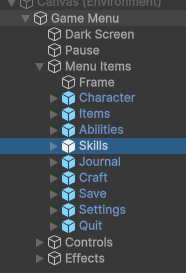
OpenUser Interface prefab, open “Screen Space UI->Menus” and drag the Skill Menu prefab imported from the package into it. Also, set the “active” on the inspector to false (just like all the other menus). Click on the object Menus and drag the SkillsMenu prefab into the property Skills.
Asset Package
Import this package that comes with scripts, a skill example and an extra ability for this skill.
Add Button in menu
Open UIGameMenuEntry.cs and add the following key to the EGameMenuAction enum:
OpenSkills
In the method OnButtonClicked add the following case:
case EGameMenuAction.OpenSkills:
    GameManager.NotificationSystem.skillsRequested.Invoke(null);
    break;
Open Game Menu prefab, duplicate one of the menu items, name it “Skills”, click on it and in the inspector set the action to “Open Skills”!
That’s it! All done!
Note: for the example ability to have effect, you need in your save to add the “Benediction” as “Bonus Ability”, and remove it from the Sheet of your hero from “Abilities”. Since abilities cannot be removed nor replaced only bonus ones.
💬 Comments (21)
public Skill[] skills => m_skills; private Skill[] m_skills = new Skill[0];
where do i add this?
Hero.csscript📜 Scripts
Want to continue the conversation?