
"Add Range" Action for commands + Min-Max Chest Loot!
 1
1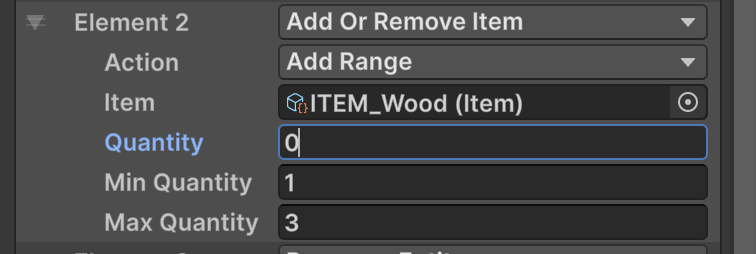
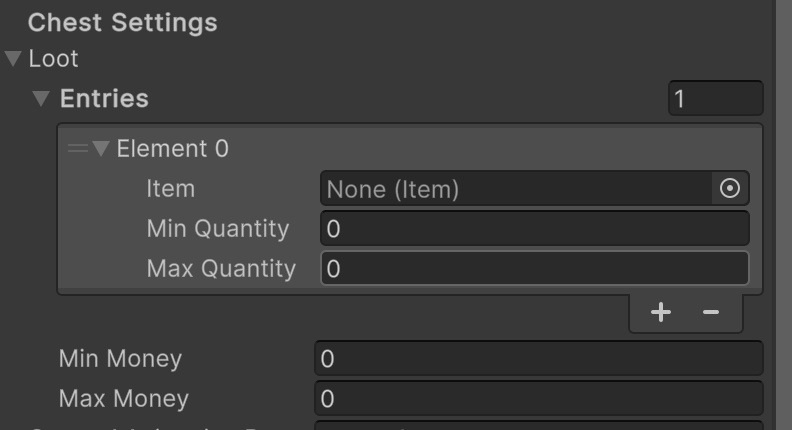
See comments for Chest loot implementation
Creates an “Add Range” option in actions to Add or Remove Item and Add or Remove Money commands!
For example, in my projects case and in the example photo below, cutting trees and mining ores gives a range of 1-3 resources.
*Note: The inspector always shows Quanity, Min and Max despite your selection, but these are only enabled based on the action selected. I’m unsure how to nest these.. I plan on extending this further with percentage changes as well, once I learn some more and can tidy things up I’ll create a package and share it here
In EAction.cs Create AddRange
using System;

namespace Gyvr.Mythril2D
{
    [Serializable]
    public enum EAction
    {
        Add,
        Remove,
        AddRange
    }
}
For AddOrRemoveItem.cs, add:
        [SerializeField] private int m_minQuantity;
        [SerializeField] private int m_maxQuantity;
… ``` case EAction.AddRange: int randomQuantity = UnityEngine.Random.Range(m_minQuantity, m_maxQuantity + 1); GameManager.InventorySystem.AddToBag(m_item, randomQuantity, EItemTransferType.Command); break; }
For **AddOrRemoveMoney.cs**, add:
```csharp
        [SerializeField] private int m_minAmount;
        [SerializeField] private int m_maxAmount;
…
                case EAction.AddRange:
                    int randomAmount = UnityEngine.Random.Range(m_minAmount, m_maxAmount + 1);
                    GameManager.InventorySystem.AddMoney(randomAmount);
                    break;
            }
That’s all! You can now add a touch of luck to your entities 🙂
“Add Range” Action for commands + Min-Max Chest Loot!
Min-Max Chest Loot! Note: This uses an alternative approach and removes the quanity option entirely from chests. If you want a specific amount to drop, simply set the min and max as the same value.
Replace Chest.cs and ChestLoot.cs
If anyone has a tidier approach please let me know 🙂
💬 Comments (2)
Want to continue the conversation?