
Fix missing reference after update
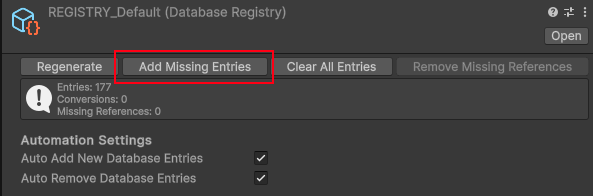
In Mythril2D, the database registry (REGISTRY_Default) stores a dictionary of unique IDs for each database entry in your game (e.g. characters, abilities, items, etc.).
The registry is NECESSARY for gameplay code to retrieve references to database entries (i.e. to properly load your data!). After upgrading from one Mythril2D version to another, it’s possible that your database registry gets OVERRIDDEN. For that not to happen, you need to specifically uncheck REGISTRY_Default from the import window when installing an update.
If your REGISTRY_Default asset happened to be overridden, you can still fix it by using this add-on button.
In DatabaseRegistryEditor.cs, below:
if (GUILayout.Button("Regenerate"))
{
    // Show a popup message to confirm the action
    bool confirmed = info.entryCount == 0 || EditorUtility.DisplayDialog("Confirmation", "Are you sure you want to replace the database registry content with all database entries? The current content of the database will be overwritten.", "Regenerate", "Cancel");

    if (confirmed)
    {
        registry.Set(Resources.FindObjectsOfTypeAll<DatabaseEntry>());
    }
}
add:
if (GUILayout.Button("Add Missing Entries"))
{
    var entries = Resources.FindObjectsOfTypeAll<DatabaseEntry>().Where(entry => !registry.HasGUID(entry.GetAssetGUID())).ToArray();
    foreach (var entry in entries)
    {
        registry.Register(entry);
    }
}
At the top of the DatabaseRegistryEditor.cs file, add:
using System.Linq;
Then in the asset browser, find REGISTRY_Default, click on it, and in the inspector, click on: “Add Missing Entries”. This should add all the missing references back into the REGISTRY_Default asset!
Just committed this to main, it will be part of the next update (3.3) 🥳
💬 Comments (0)
Be the first to comment! Join our Discord to share your thoughts.
Want to continue the conversation?