
← Back to all addons

Adding new Stats

Posted by SvanDark on Aug 20, 2025 at 3:16 PM

FeatureGameplay3.0 Verified
4 💡 1 ❄️ 1

Here’s a step by step guide on how to add movement speed stats!

  1. You’re gonna have to open the Stats script and add your new stats into the Public enum EStat, it should look like this if you’ve done it correctly:
public enum EStat
{
    Health = 0,
    Mana = 1,
    PhysicalAttack = 2,
    MagicalAttack = 3,
    PhysicalDefense = 4,
    MagicalDefense = 5,
    Agility = 6,
    Luck = 7,
    MovementSpeed = 8    // ADD THIS
}

then you’re also gonna have to bump up the Stat Count to 9 (found right below the public enum EStat)

public const int StatCount = 9;     // 8 → 9

After that open the GameConfig script and add Movement Speed stat to the Public enum EOptionalCharacterStatistics it should look like this if you’ve done it right:

public enum EOptionalCharacterStatistics
{
    None = 0,
    Mana = 1 << 0,
    MagicalAttack = 1 << 1,
    MagicalDefense = 1 << 2,
    Agility = 1 << 3,
    Luck = 1 << 4,
    MovementSpeed = 1 << 5, //ADD THIS
}
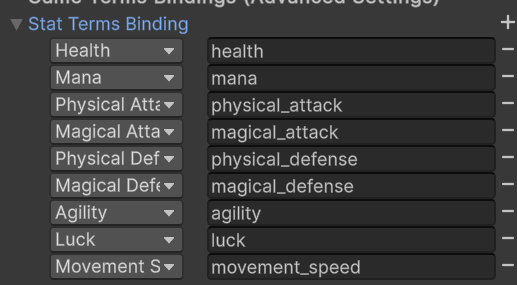
  1. Now you’re gonna head over to the CFG_Game.asset and expand Stat Terms Binding, here you’re gonna add another stat and name it movement_speed (don’t forget to select Movement Speed in the left box too)

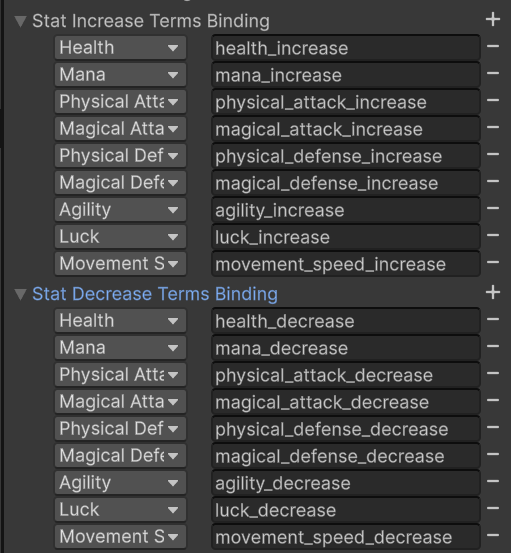
After this, you’re also gonna head expand Stat Increase Terms Binding and Stat Decrease Terms Binding, you’re basically gonna do the same thing, but you’re gonna add a: _increase and _decrease at the end (check attached screenshot)

After this, expand Game Terms and add movement_speed, simply after that expand movement_speed and choose your full name, short name, and icon.

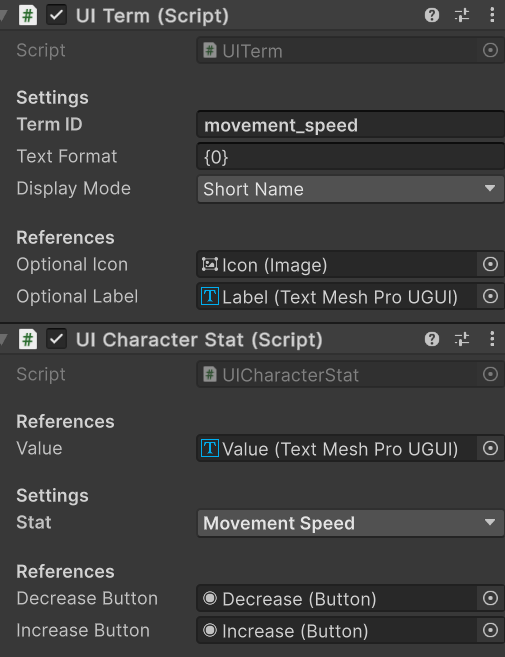
  1. Head over to the Character asset and duplicate any stat you’d like in it, after you’ve done that make sure that the UI Term and UI Character Stat looks like the third attached screenshot!

  2. Now head over to the User Interferance asset and click on Character, then add Movement Speed (UI Character Stat) with the other stats, and now it should work!

If there are any issues let me know!

💬 Comments (50)

Gyvr Aug 20, 2025 at 03:23 PM
Thanks for sharing!! I guess this guide is applicable to any additional stat
SvanDark Aug 20, 2025 at 03:23 PM
Yep, it would work just the same way!
👌 1
Gyvr Aug 20, 2025 at 03:29 PM
Since this is applicable to any stat, I’d suggest renaming the post so that more people can find it!
SvanDark Aug 20, 2025 at 03:32 PM
Adding new Stats
❤️ 1
SvanDark Aug 20, 2025 at 03:34 PM
Yeah i’m not the best with names that’s for sure!
Targa Oct 02, 2025 at 09:17 PM
@SvanDark Where is the character asset for step 3? having a time finding it
SvanDark Oct 02, 2025 at 09:19 PM
1 second, let me go into unity to double check lol
SvanDark Oct 02, 2025 at 09:23 PM

Ah my bad i made a mistake

Go to User Interferance (search for it in your project)

and then go to Character

Targa Oct 02, 2025 at 09:25 PM
eyes_sus
SvanDark Oct 02, 2025 at 09:26 PM
here!
SvanDark Oct 02, 2025 at 09:26 PM
(the search button in the top right)
Targa Oct 02, 2025 at 09:26 PM
Oh! in the assets! i dont know why i thought it was to search in hierarchy
Targa Oct 02, 2025 at 09:26 PM
so the user interface prefab, got it
Targa Oct 02, 2025 at 09:30 PM
Okay i think i got this right!
Targa Oct 02, 2025 at 09:31 PM
Although the new stats aren’t showing up in the Hero sheet though
SvanDark Oct 02, 2025 at 09:34 PM
hm? do you mind sending a screenshot?
Targa Oct 02, 2025 at 09:35 PM
Targa Oct 02, 2025 at 10:15 PM
Oops! i found the problem, i forgot to change public const int StatCount to 11
SvanDark Oct 02, 2025 at 10:19 PM

oh my bad i didn’t see this

yep that was the problem it seems like!

Targa Oct 02, 2025 at 10:25 PM
wait hold on, i have more issues, should i continue the thread here or move this to another room?
Targa Oct 02, 2025 at 11:47 PM
Hmm, i’ll leave it here just incase! but this error is what i’m getting after i hit play, this is what i placed into stats.cs
Targa Oct 02, 2025 at 11:47 PM
and gameconfig.cs
SvanDark Oct 03, 2025 at 08:22 AM
Can you show me line 82 in your Stats script?
Targa Oct 03, 2025 at 09:33 AM
Targa Oct 03, 2025 at 09:34 AM
i shouldn’t have changed anything here
SvanDark Oct 03, 2025 at 09:36 AM
I should be home in about 10 minutes, i’ll check on this then
SvanDark Oct 03, 2025 at 09:37 AM
I tried redoing the whole tutorial yesterday and i had no problem with it tho 🤔
Targa Oct 03, 2025 at 09:39 AM
i wonder if there’s at all a difference between adding 1 stat or an extra 4
Targa Oct 03, 2025 at 09:40 AM
i don’t think there would be, but unless i missed something glaring i also followed all the steps, but i definitely might have messed something up
SvanDark Oct 03, 2025 at 09:43 AM
Nah i have added multiple stats and i have had no problem with it so that shouldnt be it
SvanDark Oct 03, 2025 at 09:54 AM
okay just to double check here
SvanDark Oct 03, 2025 at 09:54 AM
Could it be because you forgot to add the , after Charisma = 11
SvanDark Oct 03, 2025 at 09:54 AM
you did it on all the other ones except that so i just want to make sure :p
SvanDark Oct 03, 2025 at 09:55 AM
if that doesn’t work, i know what we could try
Targa Oct 03, 2025 at 10:00 AM
nope :(
SvanDark Oct 03, 2025 at 10:00 AM
okay, give me 1 second, i have an idea that we could try
SvanDark Oct 03, 2025 at 10:04 AM
try to replace your Stats and GameConfig scripts with those
SvanDark Oct 03, 2025 at 10:04 AM
as in, a full replacement
Targa Oct 03, 2025 at 10:08 AM
It runs!
Targa Oct 03, 2025 at 10:08 AM
so what’s different?
SvanDark Oct 03, 2025 at 10:09 AM

Basically the whole Stats script is different

It now counts how many stats you have by itself, so you don’t have to worry about that, i’m assuming that was the problem

SvanDark Oct 03, 2025 at 10:09 AM
thanks to this
Targa Oct 03, 2025 at 10:10 AM
Ayy nice!
Targa Oct 03, 2025 at 10:10 AM
Thank you for the help, this is great
SvanDark Oct 03, 2025 at 10:10 AM
Of course! I’m glad to help!
Targa Oct 03, 2025 at 10:10 AM
now off to figuring out how i broke the dialogue box instead lmao
Targa Oct 03, 2025 at 10:11 AM
ill head out to <#1328090965751234791>
🫡 1
SvanDark Oct 03, 2025 at 10:11 AM
i usually add a bunch of comments in my scripts to explain what everything does, so you could go through it if you want!
Targa Oct 03, 2025 at 10:11 AM
heck yeah i totally should

Want to continue the conversation?