
Ingame Show Username
💡
2
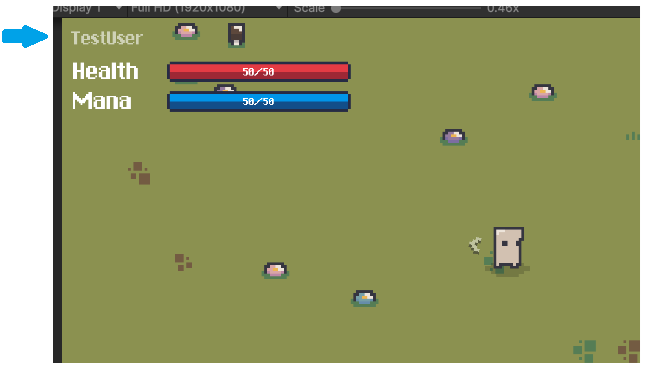
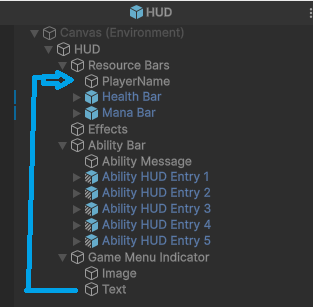
It dependens were you want to put it, in this case i put it on top of the health bar.
Just open the HUD prefab, copy the text on the bottom to the top and assign the script in attachment, thats it.
In case you want some more complex stuff, in my case i’m listening for changes. You can listen to ranks, achievmeents, abilities, wtf and update on demand.
namespace Gyvr.Mythril2D
{
    public class UIPlayerNameText : MonoBehaviour
    {

        private TextMeshProUGUI textMesh = null;
        // Start is called once before the first execution of Update after the MonoBehaviour is created
        void Start()
        {
            textMesh = this.GetComponent<TextMeshProUGUI>();
            DisplayName(); // Show on start
            GameManager.Player.achievementsChanged.AddListener(DisplayName); //listening for changes
        }

        private void DisplayName(AchievementSheet[] arg0)=>DisplayName();

        private void DisplayName()
        {
            this.textMesh.text = GameManager.Player.PlayerTitle(); //i created this method to get either the username or the achievmenet
        }
    }
}
💬 Comments (5)
Thank you very much @Mr.Titan ! awesome work!
just to clarify:
step 1 - Just open the HUD prefab, copy the text on the bottom to the top
step 2- create new monobehavior script, paste this code,, save and assign the script in attachment
Want to continue the conversation?