
Orbital Attacks (Clash Bandicoot Style) 🪐
 5
💡
1
🔥
1
5
💡
1
🔥
1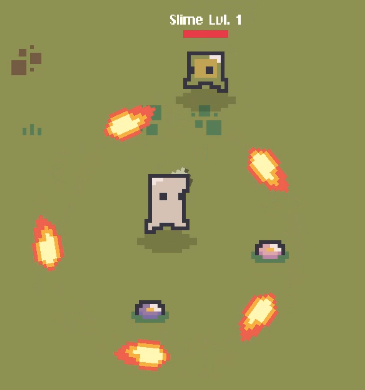
Make a projectile orbit around the emitter.
First folllow this tutorial, there’s dependencies here https://discord.com/channels/1090763611938496553/1416232520881803364
In file “ProjectileAbility.cs”
in method ThrowProjectile, bellow:
    // base spawn position
    Vector3 spawnPos = m_projectileSpawnPoint.position;

     YOUR CODE WILL GO HERE
Add the following
    //orbit will position to the center of the emitter
    if (activeAbilitySheet.orbitAroundEmitter)
    {
        spawnPos = m_character.transform.position;
    }
In file “ProjectileAbilitySheet.cs”
Addd the following on top:
        [SerializeField] private bool m_orbitAroundEmitter = false;
        public bool orbitAroundEmitter => m_orbitAroundEmitter;
continnue in the comments…..
In the file “Projectile.cs”
Add the following properties bellow:
private bool m_operating = false;

//NEWCODE GOES HERE
Add the following:
        private bool m_orbiting = false;
        private float m_currentAngle;
        private float m_orbitRadius;
Update method “Throw”
Bellow the following
m_operating = true;

//ADD THE CODE HERE
Add the following:
            //orbit
            m_orbiting = abilitySheet.orbitAroundEmitter;
            if (m_orbiting && m_source != null)
            {
                Vector3 offset = transform.position - m_source.transform.position;
                m_orbitRadius = offset.magnitude; // distance from player
                m_currentAngle = Mathf.Atan2(offset.y, offset.x); // radians!
            }
Replace all the method “FixedUpdate()” with the following
private void FixedUpdate()
{
    if (m_orbiting && m_source != null)
    {
        // advance orbit angle
        float direction = m_reverseRotation ? -1f : 1f;
        m_currentAngle += m_speed * direction * Time.fixedDeltaTime;

        // compute new orbit position
        Vector3 orbitCenter = m_source.transform.position;
        float x = Mathf.Cos(m_currentAngle) * m_orbitRadius;
        float y = Mathf.Sin(m_currentAngle) * m_orbitRadius;
        transform.position = orbitCenter + new Vector3(x, y, 0f);

        // optional: face tangent to orbit path
        Vector3 tangent = new Vector3(-Mathf.Sin(m_currentAngle), Mathf.Cos(m_currentAngle), 0f) * direction;
        transform.rotation = Quaternion.LookRotation(Vector3.forward, tangent);

        // stop rigidbody pushing it away
        m_rigidbody.linearVelocity = Vector2.zero;
    }
    else
    {
        // normal projectile behavior
        transform.rotation = Quaternion.LookRotation(Vector3.forward, m_direction * (m_reverseRotation ? -1f : 1f));
        m_rigidbody.linearVelocity =
            m_operating ?
            m_direction * m_speed :
            Vector2.zero;
    }
}
#Finalize That it now for the configurations i recomend changing the projectile prefab in the “Projectile” component to have more time before auto explode.
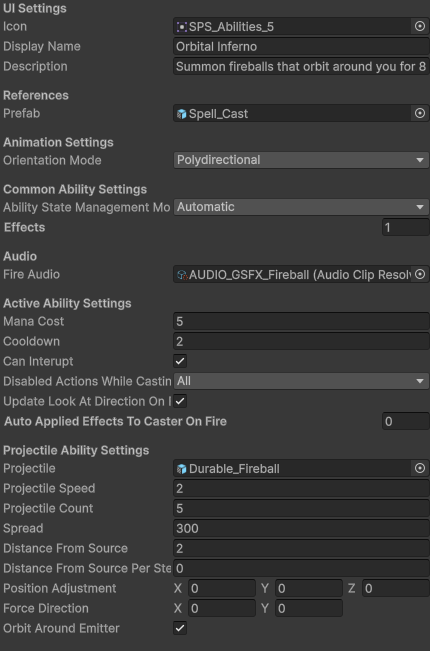
Here’s the configuration for the ability in the video:
Orbital Attacks (Clash Bandicoot Style) 🪐
💬 Comments (11)
Want to continue the conversation?