
Wave Hud Timer
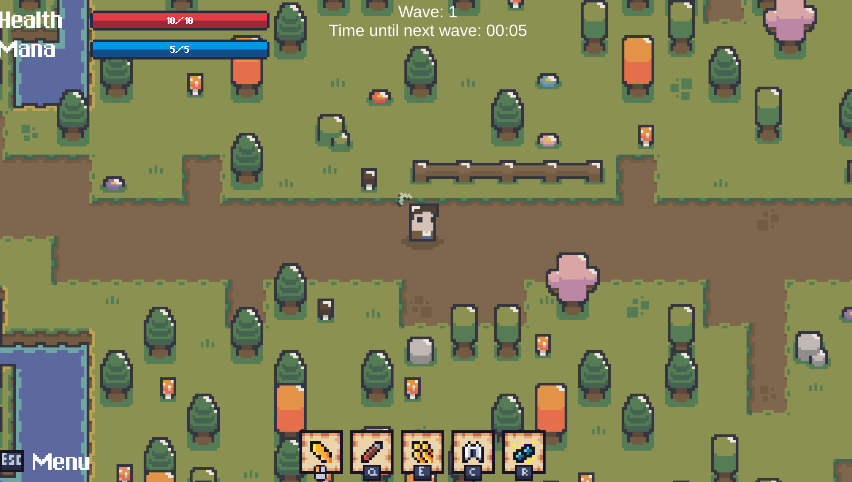
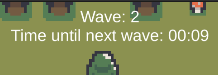
A simple and lightweight script that allows you to display and control a wave counter with a customizable timer between each wave. Designed to be plug-and-play, fully configurable through the Unity Inspector—no extra coding required.
✨** Features**
Set the Starting Wave (number)
Define the Time Until Next Wave (seconds)
Option to Auto-start when the scene begins
Customize Font, Font Size, Font Color
Adjust Text Position on Screen
Clean and minimal HUD display
⚙️** Setup**
Create an Empty GameObject in your scene.
Attach the WaveHudTimer script to it.
Configure your preferences directly in the Inspector:
Initial wave number
Countdown duration
Visual style (font, color, size, etc.)
Text positioning
🎨** Customization**
All fields are fully exposed in the Inspector for quick adjustments.
Works with any Unity-compatible font (including TMP).
Easily adaptable to different UI layouts and screen sizes.
//
using UnityEngine;
using UnityEngine.UI;
using TMPro;

public class WaveHudTimer : MonoBehaviour
{
    [Header("Configuração Inicial")]
    [SerializeField] private int waveInicial = 1;
    [SerializeField] private float segundosIniciais = 90f;
    [SerializeField] private bool iniciarAutomaticamente = true;

    [Header("Aparência (Inspector)")]
    [SerializeField] private TMP_FontAsset fonte;
    [SerializeField] private int tamanhoFonte = 28;
    [SerializeField] private Vector2 posicaoTexto = new Vector2(12f, -12f);
    [SerializeField] private Color corTexto = Color.white;

    private Canvas _canvas;
    private TextMeshProUGUI _label;
    private float _timer;
    private int _wave;
    private bool _rodando;

    void Awake()
    {
        CriarCanvasETextoSeNecessario();
        AplicarEstilo();
    }

    void Start()
    {
        if (iniciarAutomaticamente) IniciarTimer(segundosIniciais, waveInicial);
    }

    void Update()
    {
        if (!_rodando) return;

        _timer -= Time.deltaTime;
        if (_timer <= 0f)
        {
            _wave++;
            _timer = segundosIniciais; // reinicia timer
        }

        _label.text = $"Wave: {_wave}\nTime until next wave: {Formatar(_timer)}";
    }

    public void IniciarTimer(float segundos, int waveAtual)
    {
        _wave = waveAtual;
        segundosIniciais = segundos;
        _timer = Mathf.Max(0f, segundos);
        _rodando = true;
        _label.text = $"Wave: {_wave}\nTime until next wave: {Formatar(_timer)}";
    }

    public void DefinirWave(int novaWave)
    {
        _wave = novaWave;
        _label.text = $"Wave: {_wave}\nTime until next wave: {Formatar(_timer)}";
    }

    private void CriarCanvasETextoSeNecessario()
    {
        var goCanvas = new GameObject("WaveHUD_Canvas", typeof(Canvas), typeof(CanvasScaler), typeof(GraphicRaycaster));
        goCanvas.layer = LayerMask.NameToLayer("UI");
        _canvas = goCanvas.GetComponent<Canvas>();
        _canvas.renderMode = RenderMode.ScreenSpaceOverlay;

        var scaler = goCanvas.GetComponent<CanvasScaler>();
        scaler.uiScaleMode = CanvasScaler.ScaleMode.ScaleWithScreenSize;
        scaler.referenceResolution = new Vector2(1920, 1080);
        scaler.matchWidthOrHeight = 1f;

        var goText = new GameObject("WaveHUD_Text", typeof(TextMeshProUGUI));
        goText.transform.SetParent(goCanvas.transform, false);
        _label = goText.GetComponent<TextMeshProUGUI>();

        var rt = _label.rectTransform;
        rt.anchorMin = new Vector2(0.5f, 1f);
        rt.anchorMax = new Vector2(0.5f, 1f);
        rt.pivot = new Vector2(0.5f, 1f);
        rt.anchoredPosition = posicaoTexto;
    }

    private void AplicarEstilo()
    {
        if (fonte != null) _label.font = fonte;
        _label.fontSize = tamanhoFonte;
        _label.color = corTexto;
        _label.enableWordWrapping = false;
        _label.alignment = TextAlignmentOptions.Top;
        _label.text = "";
    }

    private static string Formatar(float segundos)
    {
        int total = Mathf.CeilToInt(segundos);
        int m = total / 60;
        int s = total % 60;
        return $"{m:00}:{s:00}";
    }
}
💬 Comments (2)
Want to continue the conversation?