
Character Selection Menu 👸👩🦳👨🦲
 2
2
 2
❄️
1
2
❄️
1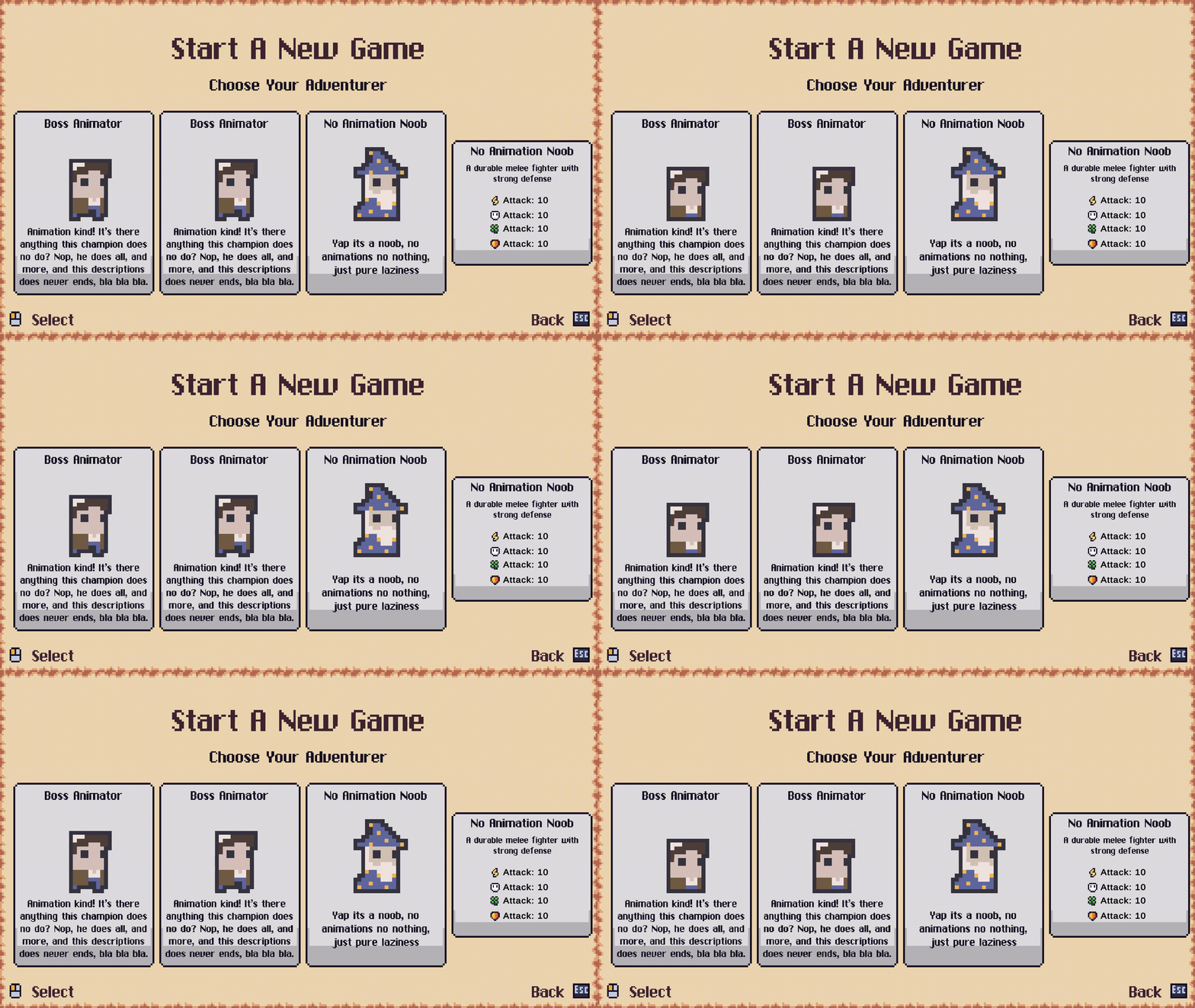
Menu that simply extends the current system with a more beautiful version of character selection. Easy to implement, all in package, little changes to do
Includes:
- 3 templates of character selection (animated, image only and text and description only)
Development notes: If you need to extend functionality such as new information to display on the hero selctions, change the “UIHeroSelection.cs”.
Import Package (its in the last comment)
Import package in attachment
Change UIMainMenu.cs:
Add m_startMenu property:
        [Header("Settings")]
        [SerializeField] private Button m_defaultSelectedButton = null;
        [SerializeField] private UISettings m_settingsMenu = null;
        [SerializeField] private UIStartMenu m_startMenu = null; // ADD THIS
On method Start() add the following:
private void Start()
{
    m_settingsMenu.Init();
    m_startMenu.Init(); //ADD THIS

    GameManager.InputSystem.ui.cancel.performed += OnCancel;
}
Add method:
public void ShowStartMenu()
{
    m_startMenu.Show(null, null);
}
In method OnCancel add the following:
private void OnCancel(UnityEngine.InputSystem.InputAction.CallbackContext context)
{
    m_settingsMenu.Hide();
    m_startMenu.Hide(); //add this
}
Setup UI
- First open “Main Menu” scene.
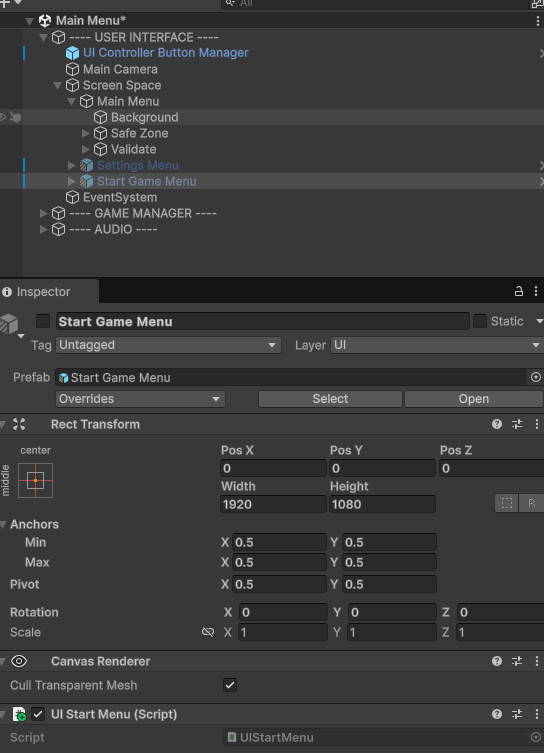
- Drag the “Start Game Menu” prefab found in path “demo->prefabs->ui->menus->Start Menu” inside of the “Screen Space” gameObject, i.e. below the “Settings Menu” [print in attachment]
- Disable the object (just like Settings Menu), AND make sure the position its all set to 0 (x,y,z).
If You want the “Start New Game” like i do, or something similar
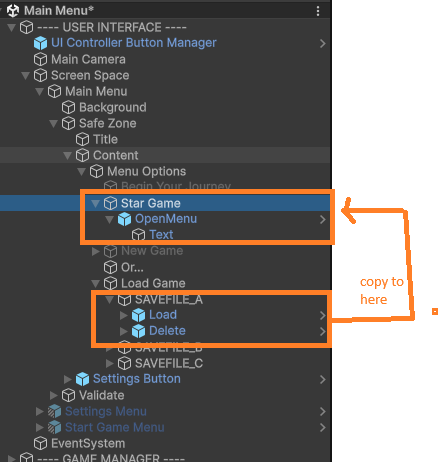
This will show the “Start Menu” . I took reference from the “Settings Button”, so if you have questions, you can always check it.
- Disable or delete the “New Game” gameobject
- Copy one of the loading game buttons from the scene ex “SAVEFILE_A” and past it inside “Menu Options” in first position. This will add the button in the hierarchy in the top position
- Remove the “Delete” object from inside it.
- Remove the component “UI Save File” from this button
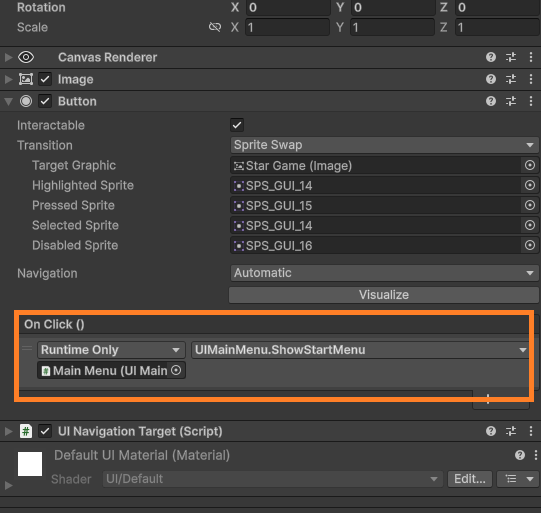
- In the “Button” component of this button object, in the “On Click” parameter, and t"Runtime Only", assign the “Main Menu” object to it and set the “UIMainMenu.ShowStartMenu”. [image in attachment]
- change the text of the button in the “Text” object
for reference:
Now For The Fun Part
Still inside of the “Main Menu” scne, inside of the “Start Game Menu”
Choose one of the templates, modify the hero selections if you want and duplicate it how many times your wish
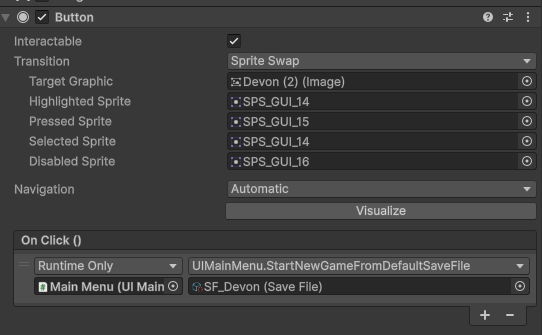
Change the “Button” parameter to call the player you want [image in attachment]
Change the “UI Hero Selection”. Check the notes bellow:
Notes of “UI Hero Selection”
- Nothing is required, you have the possibility to provide or not the name, description, image or library
- If liobrary is provided, then the “image” will be ignored
- sprite library its the one attached to you player prefab (or sheet? i dont remember).
- Whenever provided the sprite library, you need to indicate the category of you want the name of the frames (all cann be found inside of the library)
Have fun!
If you have problems, let me know!
(forgot to share the package)
💬 Comments (2)
Want to continue the conversation?