
FX System (slow motion, flash, shake...) 🧨💫
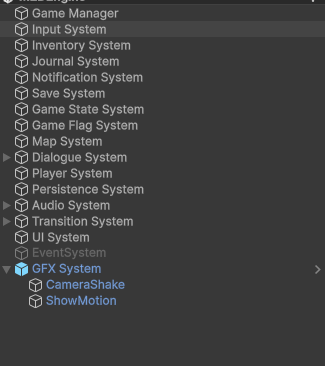
(there’s more GFX in the comments LET’S ALL CONTRIBUTE TO THIS) This system allows you to create as many fx as you want (i named it GFX as if Game FX). Currently, it comes with camera shake and slow motion, but you can extend as much as you want. I also included 2 commands to trigger these and also provided a ability integration (onFire, onCompletion)
I personally use for boss attacks, combos and ultra critical, to give it a more exciting feeling.
Development Usage:
- You can trigger it with: GameManager.GFXSystem.CameraShake.Trigger()
- You can also interrupt: GameManager.GFXSystem.CameraShake.Interrupt()
- You also listen for events using: GameManager.GFXSystem.CameraShake.OnStarted.Invoke(<YOUR_METHOD>) **or ** GameManager.GFXSystem.CameraShake.OnFinished.Invoke(<YOUR_METHOD>)
- you can also use commands TriggerCameraShakeGFX and TriggerSlowMotionGFX
(1) Import package
Import the package which contains the GFXSystem.prefab and the base scripts:
- GFXSystem
- GFXCameraShake, GFXSlowMotion
- commands
(2) Incorporate the new system in Game Manager
Open GameManager.cs and add the following line:
        //<- here are other systems like "public static UISystem UISystem => GetSystem<UISystem>();"
        public static GFXSystem GFXSystem => GetSystem<GFXSystem>();
(3) Integrate System
Open the M2DEngine scene (i.e., the main scene where all the systems are), Drag & Drop the GFXSystem.prefab present in the “prefabs.ui.systems”.
Integrate with Abilities (Optional)
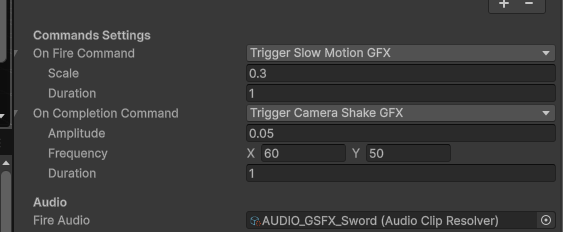
In the video, I’ve used ShowMotion on fire and camera shake on completion Now, if you want to trigger specific things for abilities, you can use commands, but for that, we need to say when to use them.
Add the commands to the AbilitySheet.cs:
        [Header("Commands Settings")]
        [SerializeReference, SubclassSelector] protected ICommand m_onFireCommand = null;
        [SerializeReference, SubclassSelector] protected ICommand m_onCompletionCommand = null;
and also add:
        public ICommand onFireCommand=> m_onFireCommand;
        public ICommand onCompletionCommand=> m_onCompletionCommand;
Execute the commands on fire or completion, by changing ActiveAbilityBase.cs
In the void Fire(…) method, add the following on top of the call Fire();:
 public void Fire(UnityAction onAbilityEnded)
 {
     //...other code
     abilitySheet.onFireCommand?.Execute(); //ADD THIS
     Fire();
     //...other code
 }
In the void TerminateCasting() method, add the following in first place:
protected void TerminateCasting()
{
    abilitySheet.onCompletionCommand?.Execute(); // ADD THIS

//....other code
}
Finally some examples of what i did
This what was in the video. Note that the “show motion” with value 0.3 it’s too much
How to extend
- Just create a gfx extending the GFXBase class
- Add your new class in the GFXSystem.cs including a gether (just duplicate what exists for one of the cases like CameraShakeGFX, and replace the CameraShakeGFX with you class.
- In the GFX System.prefab add a child objt, add your new script class to it and assign in to the Parent GFX System gameobject, on the parameter you created.
💬 Comments (4)
Finally i can type lmao
this is literally just what i needed (along with other stuff you’re making too i suppose lol), thank you so much!!
SCREEN FLASH GFX 🔦
Use the command created to trigger this or ** trigger it by code ** just like any other gfx.
📎 Files
Want to continue the conversation?