
← Back to all addons

Cast Time Abilities (bar only)
Posted by Mr.Titan on Sep 21, 2025 at 5:17 PM

ExperimentalFeature3.0 Verified
💡 2

Requires addon “https://discord.com/channels/1090763611938496553/1418235171475296380".

In can be included eveywhere, in this case include it in the player. Note that you can a should ajust the size of the bar, and the text it’s optional.

Usage:

  • Show with no text and the bar reduces: castTimeBar.?Show(<time_in_seconds>)
  • Show with text: castTimeBar.?Show(<time_in_seconds>, )
  • Show fill the bar: castTimeBar.?Show(<time_in_seconds>, , fill>) ex: castTimeBar.?Show(2f, “”, true)

Import package

This package comes with the script and the UIHUDCountdownBar.prefab.

Find were you want it

I’ve had it in the abilities prefab, and in the video i have it assign to the user (WOW style).

Change the CharacterBase.cs including the following:

        [Header("References")]
        [SerializeField] private UIHUDCountdownBar m_castTimeBar = null;
        public UIHUDCountdownBar castTimeBar => m_castTimeBar;

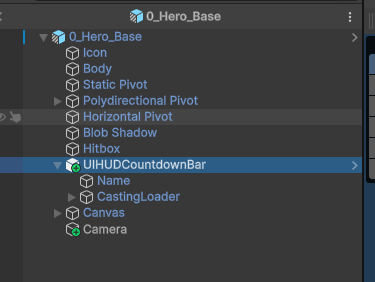
The go to the 0_Hero_Base prefab, and drop the UIHUDCountdownBar inside and ajust it in the position and size you want.

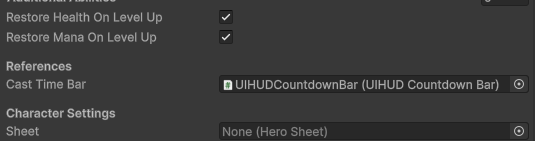
Click on the parent (i.e. 0_hero_base) in the inspector in the Hero component, assign the UIHUDCountdownBar

Make a trigger

Now there’s many ways you can do this, but the since we are extending the Cast time abilities we’ll put it in the method CastThen after the if(cast<=0f) condition:

if (cast <= 0f)
{
    onCastComplete?.Invoke();
    yield break;
}

m_character.castTimeBar?.Show(cast, activeAbilitySheet.displayName, false); //ADD THIS

THAT’S IT!

💬 Comments (27)

JP Sep 27, 2025 at 07:40 PM
Works Great! 👏
❤️ 1
SvanDark Oct 03, 2025 at 12:41 PM
does anyone know why im getting those errors 🤔 i did import the package, i did add those methods to my characterbase script, and i attatched the prefab to 0_Hero_Base
Mr.Titan Oct 03, 2025 at 01:47 PM
Did you imported the package?
Mr.Titan Oct 03, 2025 at 01:48 PM
You’re missing the component script present in thw package
SvanDark Oct 03, 2025 at 01:57 PM
yep i have both of them in my project
SvanDark Oct 03, 2025 at 01:57 PM
and the prefab is attatched to 0_Hero_Base
Mr.Titan Oct 05, 2025 at 01:38 PM
Inside of the characterbase, you should have an import to this file. Can you see it? Or is it in red? If is in red, whenever you mouse over it does not provide an import option?
SvanDark Oct 05, 2025 at 01:42 PM
i’m out on a walk atm, i’ll get back to you when i’m home!
SvanDark Oct 07, 2025 at 09:00 PM

okay my bad i’m super late on this, nope nothing i have:

  • imported the package
  • changed characterbase
  • and added the new prefab (from the package) to 0_Hero_Base

and i’m still getting that error

i suppose this is how it’s supposed to look?

Mr.Titan Oct 07, 2025 at 10:46 PM
Im not sure why you’ve put it in the character base
Mr.Titan Oct 07, 2025 at 10:46 PM
You dont want all of the character to have this, only the player right?
Mr.Titan Oct 07, 2025 at 10:47 PM
Ah sorry i just sow that i actually referemce that.
Mr.Titan Oct 07, 2025 at 10:47 PM
Let me check my code and ill gove you a feedback in a minute
SvanDark Oct 07, 2025 at 10:47 PM
Yeah i was about to say lol
SvanDark Oct 07, 2025 at 10:47 PM
🫡
Mr.Titan Oct 07, 2025 at 10:49 PM
I notice that you have it in the folder name “terroce” or something. Did you put this script inside of the folder where all your scripts are?
Mr.Titan Oct 07, 2025 at 10:49 PM
This leads to a namespace problem
SvanDark Oct 07, 2025 at 10:51 PM

No, i imported the package and it put the scripts in the same folders as you then (i suppose?)

Also which exact folder are you talking about? 🤔 the only one that i changed was from “mythril2d” to my game name

SvanDark Oct 07, 2025 at 10:51 PM
Or did you mean that?
Mr.Titan Oct 07, 2025 at 10:56 PM
Ok. So make sure you have all your scripts inside of “Terradune/Core/Runtime/Scripts”
Mr.Titan Oct 07, 2025 at 10:58 PM
Oh and that this script contains the same namespace your scripts have.
Mr.Titan Oct 07, 2025 at 10:59 PM

Since you changed from mythril2d to terradune. Is that thing

namespace Mythril2d{
Yourclass
}
 
SvanDark Oct 07, 2025 at 11:02 PM
Ahhh so that explains why
SvanDark Oct 07, 2025 at 11:03 PM
So long story short, the reason why im getting those errors is due to the namespace being changed?
Mr.Titan Oct 07, 2025 at 11:06 PM

Most likely.

You either have the file outside of the source root of your files and are missing the unity configuration to point to the new folder (is something you do in the settings), or the namespace of the script i provided is not the same as yours.

SvanDark Oct 07, 2025 at 11:07 PM
Gotcha, it’s 1 am here so i’ll let you know tomorrow if one of those two things fixed it!
Mr.Titan Oct 07, 2025 at 11:10 PM
In any case, you can always create a new script and pass the class inside (attention with the namespace). In this case there no way it can fail 🫡

Want to continue the conversation?