
Character Attack Animation Trigger By Ability
💡
4
❄️
1

You can set a different animation for each of your abilities, since most of the time you have an ability per type (projectile, sword, punch).
In the video i’ve used the “invisible” animation just for showcase.
Update IAnimationStrategy.cs
Add the following method:
bool PlayAnimation(string animationKey);
Update AAnimationStrategy.cs
Add the following:
        // Avoid checking the same key over and over; instead, store the value when evaluated
        private readonly System.Collections.Generic.Dictionary<string, bool> m_animationParameterCache = new();


        public virtual bool PlayAnimation(string animationKey)
        {
            if (string.IsNullOrEmpty(animationKey) || m_animator == null)
                return false;

            bool hasParameter;
            //avoids checking the value constantly, instead stores it's value the first time
            if (!m_animationParameterCache.TryGetValue(animationKey, out hasParameter))
            {
                hasParameter = AnimationUtils.HasParameter(m_animator, animationKey);
                m_animationParameterCache[animationKey] = hasParameter;
            }

            if (hasParameter)
            {
                m_animator.SetTrigger(animationKey);
                return true;
            }

            return false;
        }
Change AbilitySheet.cs
Add after the “m_orientationMode”:
        //AFTER THIS: [SerializeField] private EAbilityOrientationMode m_orientationMode = EAbilityOrientationMode.Polydirectional;
          //ADD THIS:
          [SerializeField] private string m_casterAnimation = "attack"; //YOU CAN SETUP YOUR DEFAULT ANIMATION KEY HERE INSTEAD OF "ATTACK"

        //AND ADD THIS TOO:
        public string casterAnimation => m_casterAnimation;
Note: If you leave this empty it will play no animation, maybe its better for most cases? I leave you decide
Change CharacterBase.cs
In the method public EAbilityFireCheckResult FireAbility(ITriggerableAbility ability):
//AFTER THIS
//if (isAbilityStateAutomaticallyManaged)
//{
//    abilityBase.gameObject.SetActive(true);
//    ability.Fire(() => abilityBase.gameObject.SetActive(false));
//}
//else
//{
//    ability.Fire(null);
//}

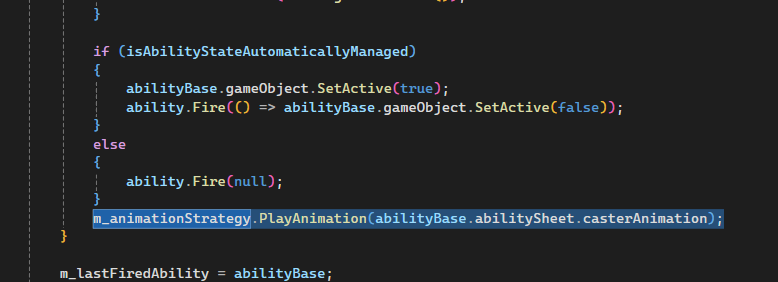
//ADD THIS
  m_animationStrategy.PlayAnimation(abilityBase.abilitySheet.casterAnimation);
[PRINT TO SHOWCASE]
Setup Animations
- In AC_Character open it
- On the top left side of the window you’ll find a Parameters tab, create a a trigger option an name it your attack (the same you setup in the AbilitySheet…. the default i gave you in the code was attack - IT’S IMPORTANT THAT YOU IT HAS THE SAME NAME)
- Create a clip and setup all the changes, and assign it to the animator and make the proper connections where you should have the condition has “attack” [image showcasing]
So the ability whenever triggered, the CharacterBase will get the “casterAnimation” from the ability, and check if it’s animator has this trigger, if it does then triggers the animation clip you setup
💬 Comments (19)
@Mr.Titan I have Attack Animations you can use to help this grow! Sword, Staff, Wand, Shield, Short Bow, Long Bow—anims in the Pixel Art Sprite Mixer with M2D export.
“https://kingbell.itch.io/pixel-sprite-mixer"
Then you end up with a network like this
Using my new “bow” animation
hi @Zuko, right now i’m just trying to follow the steps in this (edit: add-on) tutorial. I’ve set up the “Attack” state like in the picture, but the character stuck on a single sprite just like Nolyn had.
I just found out that if I used a motion provided by the demo (eg: ANIM_Character_Hit), it works as intended (no stuck on single sprite). Something might be wrong on how I make my motion, can you share a tutorial on how to make a motion to work on Mythril? I’m new to Unity. I’ve followed the tutorial here https://youtu.be/4xPHqEEa-V0?si=aEP2lv_HXFKGG6XO&t=143 minute 2:27
Ok, with help of Zuko, I’ve found that the demo animation clips are using “Sprite Key” property, but whenever I create a new animation clip, I always add the sprites to “Sprite Hash” property. I think it’s because I’m using newer Unity?
We can’t mix the “Sprite Key” and “Sprite Hash”, so I recreate all the demo clips again, and it works as intended now. Thanks!
Want to continue the conversation?