
Dialogue Variants
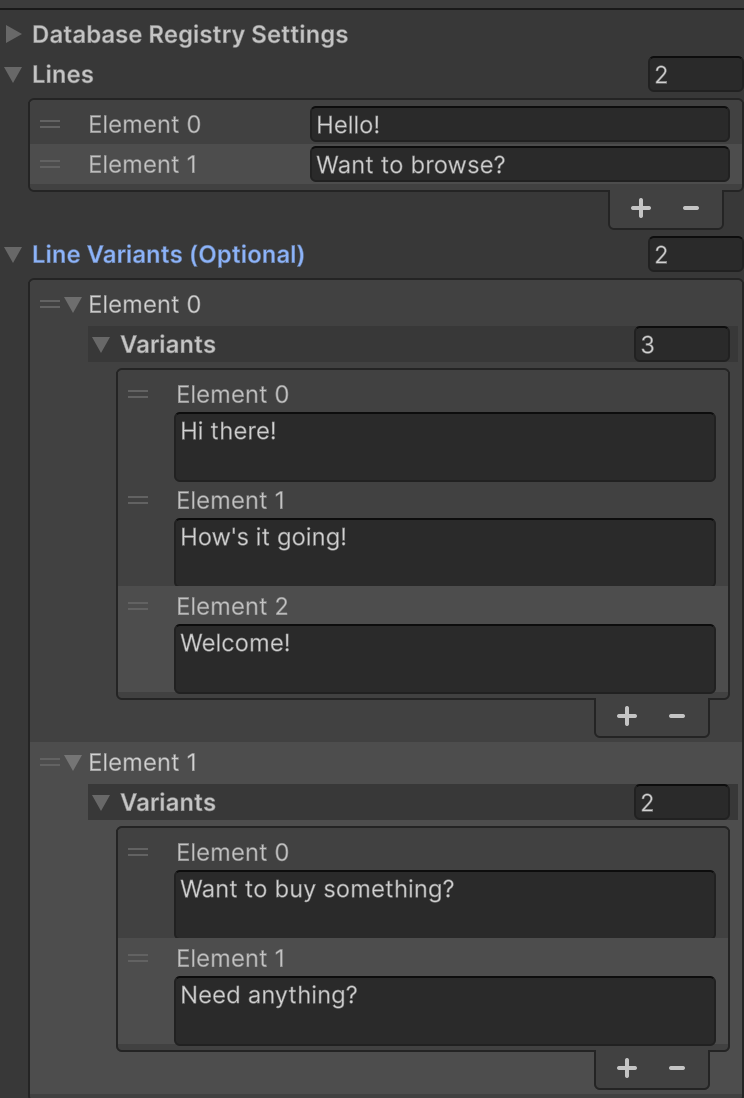
Bring NPCs to life with Dialogue Pools! This creates a new section in the Dialogue Sequence objects, “Line Variants”. You can add multiple dialogue options to each Line, and it will randomly select one in-game!
In this screenshot for example, the NPC will open with: “Hello!”, or: “Hi There!”, “How’s it going!”, “Welcome!”. Followed by the next line “Want to browse?” or: “Want to buy something?, “Need anything”?
1. Add DialogueLineVariants.cs (NEW FILE)
Download this script and place it into your files. Store this in: Assets/Mythril2D/Core/Runtime/Scripts/Database/Dialogues/
** 2. Modify DialogueSequence.cs** Find this line:
public string[] lines = null;
And add the following after it:
public DialogueLineVariants[] lineVariants = null;
3: Modify DialogueUtils.cs Find this section:
for (int i = 0; i < sequence.lines.Length; ++i)
{
    DialogueNode current = new();

    string lineText = sequence.lines[i];
    current.text = StringFormatter.Format(lineText, args);
    current.speaker = speaker;
And Replace with this:
for (int i = 0; i < sequence.lines.Length; ++i)
{
    DialogueNode current = new();

    string lineText = sequence.lines[i];

    if (sequence.lineVariants != null && i < sequence.lineVariants.Length && sequence.lineVariants[i] != null)
    {
        var variants = sequence.lineVariants[i];
        if (variants.variants != null && variants.variants.Length > 0)
        {
            string[] allOptions = new string[variants.variants.Length + 1];
            allOptions[0] = lineText;
            System.Array.Copy(variants.variants, 0, allOptions, 1, variants.variants.Length);

            lineText = allOptions[UnityEngine.Random.Range(0, allOptions.Length)];
        }
    }

    current.text = StringFormatter.Format(lineText, args);
    current.speaker = speaker;
More in comments
4. Edit DialogueSequenceEditor.cs Add in the property declaration (add between m_lines and m_options)
private SerializedProperty m_lineVariants;
Find:
void OnEnable()
{
    m_lines = serializedObject.FindProperty("lines");
    m_options = serializedObject.FindProperty("options");
    m_toExecuteOnStart = serializedObject.FindProperty("toExecuteOnStart");
    m_toExecuteOnCompletion = serializedObject.FindProperty("toExecuteOnCompletion");
}
And add the following between m_lines and m_options:
m_lineVariants = serializedObject.FindProperty("lineVariants");
Then find
public override void OnInspectorGUI()
{
    base.OnInspectorGUI();

    serializedObject.UpdateIfRequiredOrScript();

    EditorGUILayout.PropertyField(m_lines);
    EditorGUILayout.Separator();
    m_options.arraySize = EditorGUILayout.IntSlider("Option Count", m_options.arraySize, 0, 3);
and add the following after m_lines:
EditorGUILayout.PropertyField(m_lineVariants, new GUIContent("Line Variants (Optional)"));
Hopefully these instructions work and make sense, I rushed through them. I can provide all the scripts to drop in if required
💬 Comments (5)
Want to continue the conversation?