
← Back to all addons

Enhanced Scene Selector
Posted by Soho on Feb 10, 2026 at 1:40 AM

FeatureEditor
❄️ 3

Inspired by discussions with Zuko and Gyvr, and the growing amount of scenes in my project!

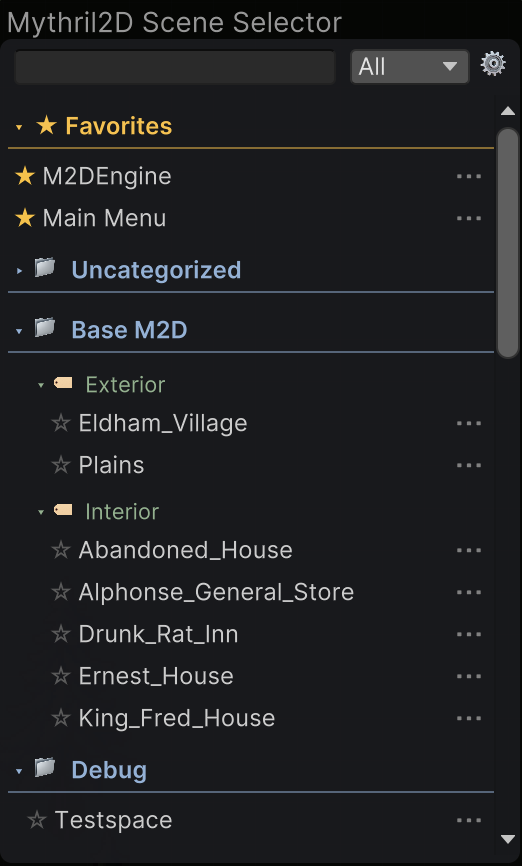
Advanced sorting, with: Favourites: Pin scenes to the top of the selector using the ★ button. Categories: Organise scenes by region/zones (e.g., “x Forest”, “World 1”) Subcategories: Group further by types! (Interior, Exterior, Dungeon, etc) Collapsable Sections: Collapse Categories and Subcategories by clicking on them! Tags: Mark scene status and filter by tags (WIP, Complete, Needs Review, Playtest) Search & Filter: Find scenes by name or filter by tags Not In Build Profile - Scenes not in build settings shown in separate section

How to use:

Organising Scenes Settings: Click the gear icon to add/remove Categories, Subcategories, and Tags Assign: Click the dots on any scene row to assign Category, Subcategory, or Tags Favourite - Click the star icon to add/remove from Favourites

How to install: Drop the package in and install! Done.

See comments for updated version

Also check out <#1466083278539853935> and <#1469156486461784134> as part of my editor overhaul! More to come soon 🙂

💬 Comments (39)

Gyvr Feb 10, 2026 at 01:40 AM
Beautiful! Thanks for sharing! Love the icons 😄
❤️ 1
Soho Feb 10, 2026 at 01:42 AM
Thanks! The tags add icons next to the selection icon too - it wont work for custom ones but it would be cool to add an icon selector in a future update
👌 2
Soho Feb 10, 2026 at 01:46 AM
Some more screen grabs I should have added
🔥 2
Gyvr Feb 10, 2026 at 01:47 AM
I’m sure @Zuko will love this 😄
❤️ 1
Zuko Feb 10, 2026 at 07:30 PM
And you weren’t wrong. I absolutely loved it! 🔥 🚀 🤣
Zuko Feb 10, 2026 at 07:30 PM
fantastic work, as always
Zuko Feb 10, 2026 at 07:31 PM
At this point, I think I’m a bit biased about which add-ons I’m going to vote for in the contests. If you see my vote on all of @Soho add-ons, it’s not a coincidence
😆 2 ❤️ 1
Zuko Feb 11, 2026 at 02:57 PM
Assign: Click the dots on any scene row to assign Category, Subcategory, or Tags
Zuko Feb 11, 2026 at 02:57 PM
I didnt get this part
Zuko Feb 11, 2026 at 03:00 PM
cant find the dots
Soho Feb 11, 2026 at 03:00 PM
If you click on the … next to the scene name 🙂
Soho Feb 11, 2026 at 03:00 PM
On the right
Zuko Feb 11, 2026 at 03:01 PM
this dots?
Soho Feb 11, 2026 at 03:02 PM
These ones
Soho Feb 11, 2026 at 03:02 PM
And you can change them in the settings
Zuko Feb 11, 2026 at 03:03 PM
i dont have this dots
Soho Feb 11, 2026 at 03:03 PM
Huh.. Let me add it to a new M2D project
Zuko Feb 11, 2026 at 03:04 PM
sorry to give u trouble, as always
Zuko Feb 11, 2026 at 03:04 PM
always bothering
Zuko Feb 11, 2026 at 03:04 PM
hahahahah
Soho Feb 11, 2026 at 03:04 PM
Not at all, if its missing thats my fault 🙂 I’m glad you mentioned it
Soho Feb 11, 2026 at 03:05 PM
Hmm.. they appear on my end
Soho Feb 11, 2026 at 03:05 PM
If you press the area they’re located, does the menu open?
Zuko Feb 11, 2026 at 03:06 PM
i am trying to print for you
Zuko Feb 11, 2026 at 03:06 PM
i think its not maximized
Zuko Feb 11, 2026 at 03:06 PM
but i cant maximize either
Soho Feb 11, 2026 at 03:06 PM
Yeah, it should be 1 size
Zuko Feb 11, 2026 at 03:07 PM
here
Soho Feb 11, 2026 at 03:08 PM
When you click where they’re supposed to be, does the menu open?
Soho Feb 11, 2026 at 03:09 PM
I notice your icons look different to mine, so I’m assuming the icon itself is just missing
Zuko Feb 11, 2026 at 03:09 PM
yes
Zuko Feb 11, 2026 at 03:09 PM
it open
Zuko Feb 11, 2026 at 03:09 PM
for some reason the icon does not appear
Soho Feb 11, 2026 at 03:10 PM
Ok, I’ll make an update with an icon thats supported
Zuko Feb 11, 2026 at 03:12 PM
thanks bro
Soho Feb 11, 2026 at 03:31 PM
Update: Changed menu ASCII to unity icon. Increased Search bar and filter height, fixed back icon when entering settings menu
❤️ 1
BellBlitzKing Feb 11, 2026 at 09:06 PM
Super helpful!
❤️ 1

Want to continue the conversation?